


Introduction
Business automation tools are becoming a core part of modern digital operations, helping companies simplify complex workflows and reduce manual effort. In today’s fast-moving business environment, efficiency is not optional but essential. Organizations of all sizes are adopting business automation tools to save time, improve accuracy, and scale operations without increasing workload.
For beginners, automation may sound technical or overwhelming, but the idea is simple. Instead of performing repetitive tasks manually, software systems handle them automatically based on predefined rules. This shift allows teams to focus on creativity, strategy, and decision-making rather than routine work.
From sending emails and managing customer data to tracking sales and generating reports, business automation tools are now used in nearly every industry. Businesses that once relied heavily on manual processes are now achieving faster results with fewer errors.
In this guide, you will explore what business automation tools are, why they matter, how to use them step by step, and what mistakes to avoid. You will also learn practical benefits, risks, expert tips, and answers to common questions. By the end, you will have a clear understanding of how these tools can transform everyday operations and support long-term business growth.
What is Business Automation Tools?
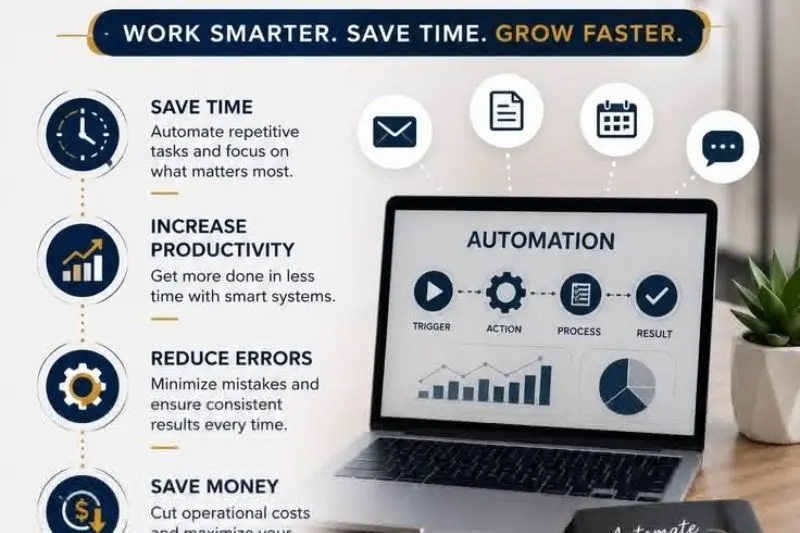
Business automation tools are software applications designed to perform repetitive tasks automatically with minimal human input. These tools are built to streamline workflows, reduce errors, and improve efficiency across different departments of a business.
In simple terms, business automation tools act like digital assistants that handle routine operations. For example, instead of manually sending welcome emails to every new customer, an automation system can trigger and send those emails instantly when someone signs up.
These tools can manage a wide range of activities such as customer relationship management, email marketing, invoicing, data entry, social media scheduling, and project tracking. Many modern businesses rely on them to maintain consistency and reduce workload.
Popular categories of business automation tools include CRM platforms, marketing automation systems, workflow management software, and financial automation tools. Each category serves a specific purpose but shares the same goal: reducing manual effort and improving productivity.
Industries such as retail, healthcare, finance, education, and IT services use automation extensively. As digital transformation continues, the use of business automation tools is expected to grow even further.
Why is Business Automation Tools Important?

The importance of business automation tools lies in their ability to improve efficiency while reducing operational costs. Businesses today face increasing competition, and automation provides a way to stay ahead without overburdening teams.
One major benefit is time savings. Repetitive tasks that once took hours can now be completed in seconds. This allows employees to focus on higher-value work such as planning, innovation, and customer engagement.
Another key advantage is accuracy. Manual processes are often prone to human error, especially when dealing with large amounts of data. Business automation tools significantly reduce these mistakes by following consistent rules every time.
Scalability is another important factor. As a business grows, manual systems struggle to keep up with increasing demand. Automation allows companies to handle larger workloads without hiring additional staff at the same rate.
Additionally, these tools improve communication and customer experience. Automated responses ensure that customers receive timely updates and support, which increases satisfaction and trust.
Overall, business automation tools are not just a convenience but a necessity for businesses that want to remain competitive in a digital-first world.
Detailed Step-by-Step Guide
Step 1: Identify Repetitive Tasks
The first step in implementing business automation tools is identifying tasks that are repetitive and time-consuming. These may include sending emails, updating spreadsheets, generating reports, or managing customer inquiries.
By listing these tasks, businesses can clearly see where automation will have the most impact.
Step 2: Choose the Right Tool
Once tasks are identified, the next step is selecting the right business automation tools. The choice depends on business size, budget, and specific needs.
Some tools focus on marketing, while others specialize in project management or customer service. It is important to choose a platform that aligns with your goals and integrates well with existing systems.
Step 3: Set Clear Objectives
Before implementing automation, define clear goals. For example, you may want to reduce response time, increase lead conversions, or improve reporting accuracy.
Having clear objectives ensures that automation efforts remain focused and measurable.
Step 4: Design and Configure Workflows
This step involves setting up automated workflows. A workflow is a sequence of actions triggered by specific conditions.
For example, when a customer fills out a form, the system can automatically send a confirmation email, assign a sales representative, and update the CRM database.
Step 5: Test the System
Before fully launching automation, testing is essential. This ensures that workflows function correctly and no errors occur during real operations.
Testing helps identify gaps and allows adjustments before full deployment.
Step 6: Monitor and Improve
After implementation, continuous monitoring is necessary. Business needs evolve, and automation systems should be updated regularly to remain effective.
Performance tracking helps identify areas for improvement and ensures long-term success.
Benefits of Business Automation Tools
- Saves significant time by reducing manual tasks
- Increases productivity across teams and departments
- Reduces human errors in data handling and operations
- Improves customer experience through faster responses
- Enhances business scalability without major cost increases
- Provides accurate data and reporting insights
- Helps reduce overall operational expenses
- Improves workflow consistency across processes
Disadvantages / Risks
- Initial setup can be time-consuming and complex
- Employees may require training to use systems effectively
- Over-automation can reduce human interaction in some cases
- Technical issues may disrupt automated workflows
- Subscription costs for advanced tools can be high
- Improper setup may lead to inefficient processes
Common Mistakes to Avoid
One common mistake businesses make is automating too many processes at once. This can create confusion and reduce efficiency instead of improving it.
Another mistake is failing to define clear goals before implementation. Without direction, automation may not deliver meaningful results.
Ignoring employee training is also a frequent issue. Even the best business automation tools are ineffective if users do not understand how to operate them properly.
Some businesses also forget to monitor performance after setup. Automation requires ongoing adjustments to remain effective as business needs change.
FAQs
What are business automation tools used for?
They are used to automate repetitive tasks such as marketing, sales, customer service, and data management, allowing businesses to save time and improve efficiency.
2. Are business automation tools expensive?
Costs vary depending on features and scale. Some tools are free or affordable, while advanced enterprise systems may require higher investment.
3. Can small businesses benefit from automation tools?
Yes, small businesses benefit greatly because automation helps them save time, reduce workload, and operate more efficiently with limited resources.
4. Do automation tools replace employees?
No, they do not replace employees. Instead, they support teams by handling repetitive tasks so employees can focus on more important work.
5. What industries use business automation tools?
Industries like marketing, healthcare, finance, education, retail, and IT services commonly use automation tools to improve operations.
6. Is coding required to use automation tools?
Most modern business automation tools are designed for non-technical users and do not require coding knowledge.
Expert Tips & Bonus Points
Start small by automating one process at a time instead of multiple workflows at once. This helps you understand how systems behave and reduces errors.
Choose tools that are scalable so they can grow with your business. This prevents the need for frequent system changes.
Regularly review performance metrics to ensure automation is delivering expected results. Optimization is key to long-term success.
Combine different tools for better integration, such as linking CRM systems with email marketing platforms for smoother workflows.
Conclusion
Business automation tools have become essential for businesses that want to operate efficiently in a competitive environment. They reduce manual workload, improve accuracy, and allow teams to focus on strategic goals instead of repetitive tasks.
As technology continues to evolve, automation will play an even bigger role in shaping how businesses function. Companies that adopt these tools early gain a significant advantage in productivity and scalability.
For beginners, the best approach is to start simple. Identify small repetitive tasks and automate them step by step. Over time, these small improvements lead to major efficiency gains.
Ultimately, business automation tools are not just about saving time; they are about building smarter, more agile, and more competitive organizations. Businesses that embrace automation today are better prepared for the challenges of tomorrow.
