

Introduction
Cloud computing has transformed the way individuals and businesses use technology. Instead of relying only on physical computers or local servers, people can now access applications, storage, and computing power through the internet. This shift has made technology more flexible, affordable, and accessible than ever before. Whether you are saving files online, streaming videos, or collaborating on a shared document, chances are you are already using cloud-based services without even realizing it.
Understanding cloud computing explained in simple language is important because cloud technology is becoming a standard part of everyday life. Businesses use it to reduce costs, improve efficiency, and scale operations. Students rely on it for online learning, while developers use cloud platforms to build modern applications. Even small businesses can benefit from enterprise-level technology without making significant investments in expensive hardware.
This guide breaks down cloud computing into simple concepts that anyone can understand. You will learn what cloud computing is, why it matters, how it works, its different service models, deployment types, benefits, potential risks, and practical examples. Whether you are a complete beginner or someone looking to strengthen your technical knowledge, this comprehensive guide will help you understand the fundamentals of cloud computing with confidence.
What Is Cloud Computing?
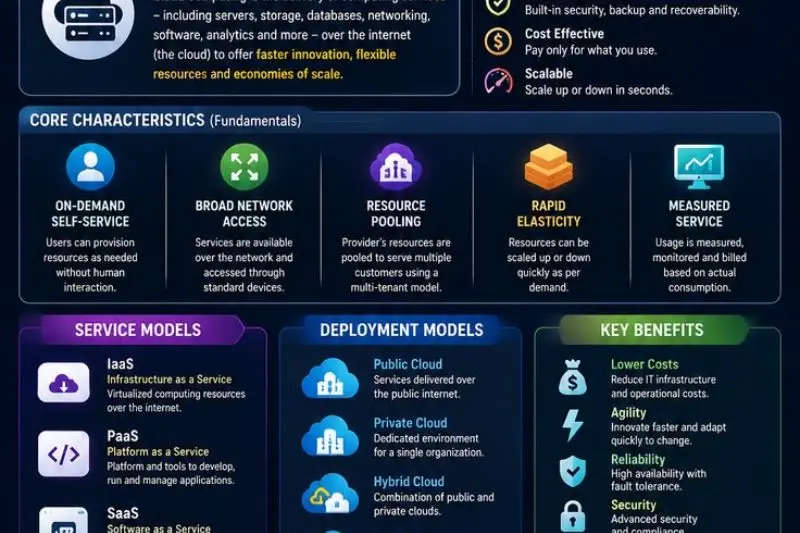
Cloud computing is the delivery of computing services over the internet. Instead of storing data or running software on your own computer, you access these resources through remote servers maintained by cloud service providers.
Think of the cloud as a giant network of powerful computers located in secure data centers around the world. These computers provide services whenever users need them.
Common cloud services include:
- Online file storage
- Web hosting
- Email platforms
- Business software
- Video streaming
- Data backup
- Artificial intelligence tools
- Database management
For example, when you upload photos to an online storage service instead of saving them only on your laptop, you are using cloud computing.
Why Is Cloud Computing Important?
Cloud computing has become one of the most important technologies in the digital age because it offers flexibility, efficiency, and cost savings.
Organizations no longer need to purchase expensive servers or maintain complex IT infrastructure. Instead, they pay only for the resources they actually use.
Cloud computing is important because it provides:
- Faster business growth
- Lower technology costs
- Better collaboration
- Secure data backup
- Easy software updates
- Global accessibility
- Disaster recovery capabilities
- Flexible scaling
It also supports innovation by allowing developers to build and launch applications much faster than traditional systems.
Step-by-Step Guide to Understanding Cloud Computing
Step 1: Understand the Basic Concept
Cloud computing means accessing computing resources through the internet instead of owning physical infrastructure.
Instead of installing software locally, users connect to cloud platforms that provide everything they need remotely.
Step 2: Learn the Three Main Service Models
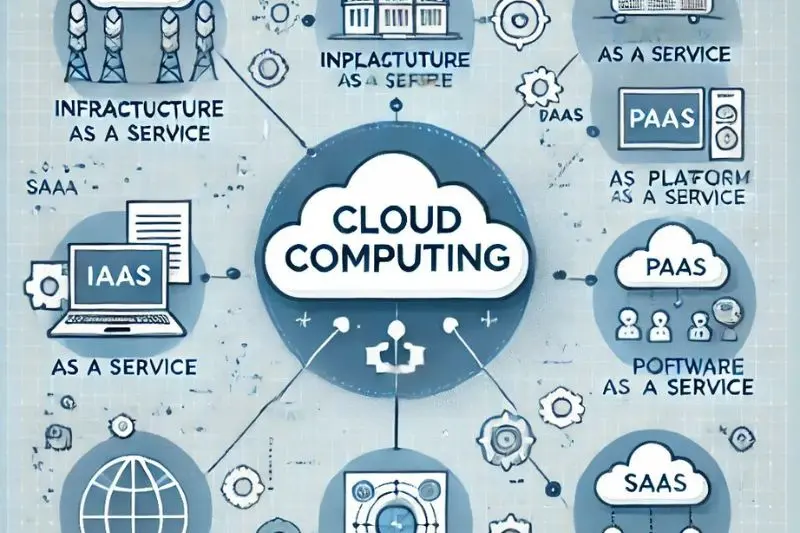
Infrastructure as a Service (IaaS)
Infrastructure as a Service provides virtual servers, storage, networking, and computing resources.
Users manage their operating systems and applications while the provider maintains the physical hardware.
Examples include virtual machines and cloud storage.
Platform as a Service (PaaS)
Platform as a Service offers a complete development environment where developers can create, test, and deploy applications.
The cloud provider manages infrastructure while developers focus on writing code.
Software as a Service (SaaS)
Software as a Service delivers ready-to-use applications through a web browser.
Users simply log in and begin using the software without installing anything.
Examples include online email, collaboration software, and project management tools.
Step 3: Understand Cloud Deployment Models
Cloud computing can be deployed in different ways depending on organizational needs.
Public Cloud
Public cloud services are available to anyone over the internet.
They are affordable, highly scalable, and managed by third-party providers.
Private Cloud
Private cloud environments are dedicated to a single organization.
They provide greater control, security, and customization.
Hybrid Cloud
Hybrid cloud combines both public and private clouds.
Organizations keep sensitive data in private infrastructure while using public resources for less critical workloads.
Multi-Cloud
A multi-cloud strategy uses services from multiple cloud providers.
This improves flexibility and reduces dependence on a single vendor.
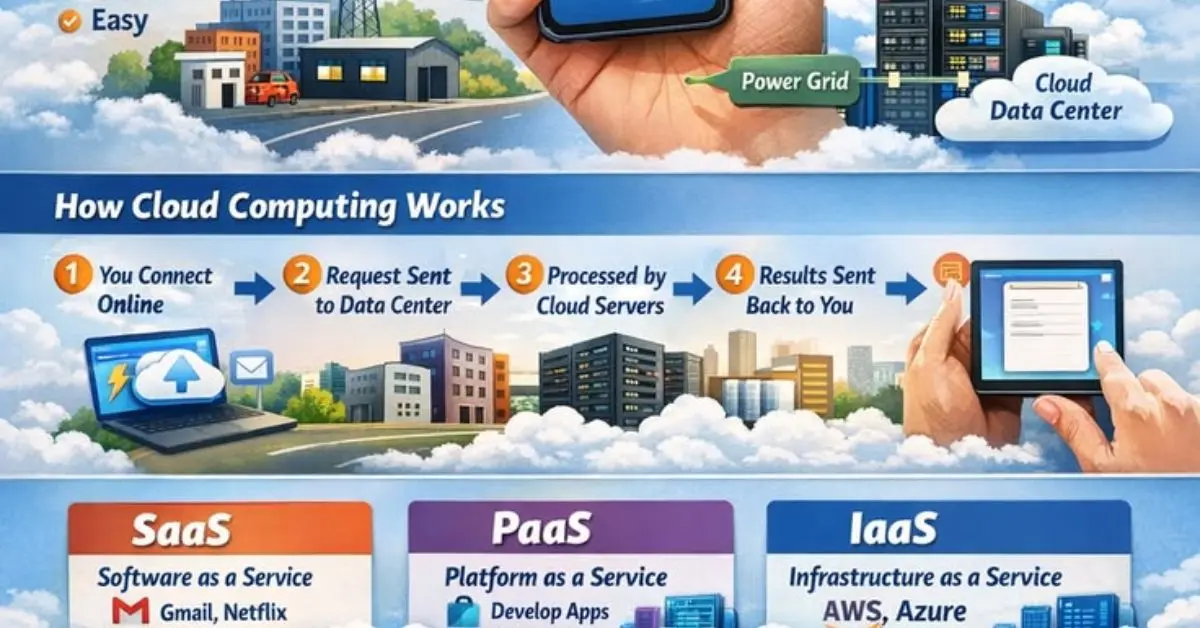
Step 4: Learn How Cloud Computing Works
Cloud providers operate massive data centers filled with servers.
When users request storage or computing power, these servers process the request and deliver results through the internet.
Virtualization technology allows multiple users to securely share physical hardware while maintaining separate environments.
Automation tools allocate resources whenever demand increases or decreases.
Step 5: Explore Common Applications
Cloud computing supports countless daily activities.
Popular examples include:
- Online backups
- Video conferencing
- File sharing
- Website hosting
- Mobile applications
- Online education
- Digital banking
- Customer relationship management
- Business analytics
- Software development
Step 6: Understand Cloud Security
Security remains one of the most important aspects of cloud computing.
Cloud providers invest heavily in protecting customer data.
Security measures include:
- Data encryption
- Firewalls
- Identity management
- Multi-factor authentication
- Continuous monitoring
- Security audits
- Access controls
- Automatic backups
Although providers offer strong security, users must also create strong passwords, update software, and manage permissions carefully.
Step 7: Learn About Scalability
One major advantage of cloud computing is scalability.
Businesses can increase computing power during busy periods and reduce resources when demand decreases.
This flexibility helps companies avoid unnecessary expenses while maintaining excellent performance.
Step 8: Monitor Performance and Costs
Cloud services typically follow a pay-as-you-go pricing model.
Organizations should monitor usage regularly to avoid unexpected costs.
Cost optimization includes:
- Removing unused resources
- Monitoring storage
- Scheduling workloads efficiently
- Choosing appropriate service plans
Regular monitoring ensures maximum value from cloud investments.
Benefits of Cloud Computing
Cloud computing provides numerous advantages for individuals and organizations.
- Lower upfront infrastructure costs
- Pay only for resources used
- Easy access from anywhere
- Improved collaboration between teams
- Faster software deployment
- Automatic updates
- High availability
- Reliable disaster recovery
- Better business continuity
- Flexible scalability
- Strong security features
- Global accessibility
- Faster innovation
- Reduced maintenance
- Environmentally efficient data centers
- Better resource utilization
- Simplified backup solutions
- Enhanced productivity
- Improved customer experiences
- Support for remote work
These benefits explain why organizations of every size continue adopting cloud technologies.
Disadvantages and Risks
Despite its many advantages, cloud computing also presents several challenges.
- Internet dependence
- Potential service outages
- Data privacy concerns
- Vendor lock-in
- Unexpected monthly expenses
- Compliance challenges
- Migration complexity
- Limited customization in some services
- Shared responsibility for security
- Performance issues during connectivity problems
Understanding these risks helps organizations develop better cloud strategies.
Common Mistakes to Avoid
Many beginners make avoidable mistakes when adopting cloud computing.
One common mistake is assuming the cloud automatically provides complete security. While providers protect infrastructure, users remain responsible for managing passwords, permissions, and sensitive information.
Another mistake is ignoring cost management. Leaving unused virtual machines running continuously can increase monthly expenses significantly.
Choosing services without understanding business requirements often results in unnecessary complexity.
Organizations should also avoid poor backup strategies. Even though cloud providers maintain infrastructure, users should create additional backups for critical data.
Failing to monitor system performance can reduce efficiency over time.
Finally, neglecting employee training may create security risks and reduce productivity.
Avoiding these mistakes helps maximize the value of cloud technology.
Frequently Asked Questions
1. Is cloud computing safe?
Yes. Most major cloud providers invest heavily in cybersecurity, encryption, monitoring, and physical security. However, users must also follow good security practices such as strong passwords and multi-factor authentication.
2. Do I need technical knowledge to use cloud services?
No. Many cloud services are designed for everyday users and require little or no technical expertise. More advanced cloud management does require specialized skills.
3. Can small businesses benefit from cloud computing?
Absolutely. Small businesses often benefit the most because cloud services eliminate the need for expensive hardware investments while providing enterprise-level capabilities.
4. What industries use cloud computing?
Nearly every industry uses cloud technology, including healthcare, education, banking, retail, manufacturing, entertainment, government, transportation, and telecommunications.
5. Does cloud computing reduce costs?
In many situations, yes. Organizations save money on hardware purchases, maintenance, electricity, software updates, and IT staffing while paying only for resources they consume.
6. What happens if the internet connection fails?
Most cloud services require internet connectivity. If the connection is unavailable, users may temporarily lose access until service is restored, although some applications provide limited offline functionality.
7. Can cloud computing grow with my business?
Yes. Scalability is one of cloud computing’s greatest strengths. Businesses can quickly increase or decrease computing resources based on changing demands.
8. What skills should beginners learn first?
Beginners should understand cloud fundamentals, networking basics, storage concepts, security principles, virtualization, and the different cloud service models before exploring advanced topics.
Expert Tips and Bonus Points
If you are beginning your cloud computing journey, focus on understanding the basic concepts before learning specific platforms.
Practice using free cloud services to gain hands-on experience.
Always organize files logically to simplify management.
Enable multi-factor authentication on every important account.
Review cloud spending regularly to prevent unnecessary expenses.
Understand the shared responsibility model for cloud security.
Learn basic networking concepts because they improve your understanding of cloud architecture.
Keep software updated to reduce security vulnerabilities.
Automate repetitive tasks whenever possible to improve efficiency.
Document configurations carefully so systems remain easy to manage.
Continue learning because cloud technologies evolve rapidly.
Most importantly, choose cloud solutions based on your actual needs rather than selecting the most complex option available.
Conclusion
Cloud computing has fundamentally changed how people access technology, manage data, and build digital solutions. Instead of depending solely on local computers and expensive infrastructure, users can now take advantage of flexible, scalable, and cost-effective computing resources delivered through the internet. From storing personal files to running global business applications, cloud technology has become an essential part of everyday life.
Understanding cloud computing explained in simple terms provides a strong foundation for exploring today’s digital world. As organizations continue embracing digital transformation, cloud skills are becoming increasingly valuable across almost every industry. Whether you are a student, entrepreneur, IT professional, or business owner, learning the basics of cloud computing opens the door to new opportunities and greater efficiency.
While cloud computing offers impressive advantages such as scalability, accessibility, and reduced costs, it also requires thoughtful planning, strong security practices, and ongoing management. By understanding both the benefits and the potential challenges, users can make informed decisions and maximize the value of cloud services.
As technology continues evolving, cloud computing will remain at the center of innovation. Building a solid understanding today will help you confidently adapt to tomorrow’s digital landscape and take full advantage of the opportunities cloud technology continues to create.
